Sellerboard For Shopify – Pick & Pack Tutorial – Extra Costs To Consider

When you’re calculating profit for your Shopify store, it’s easy to focus on product costs, shipping, and advertising.
However, there’s another cost that can quietly eat into your margins: Pick & Pack fees.
In this guide, I’ll walk through how to set up and understand Pick & Pack costs in Sellerboard for Shopify.
Get 2-Month Extended Sellerboard Free Trial
Why Pick and Pack Costs Matter
When you’re selling via Amazon FBA, Pick & Pack is usually bundled into Amazon’s fulfillment fee.
But in Shopify, especially if you’re working with a third-party warehouse (3PL), these charges are separate and can vary widely.
Pick & Pack costs include:
-
Picking – A warehouse worker locates and retrieves your product from the shelf.
-
Packing – The item is packaged securely, ready for shipping.
Unlike FBA’s flat fee, your 3PL may bill per package or per item, and these rates can be different.
Here’s a full walkthrough that shows how Sellerboard works across all Shopify costs, not just pick and pack: How To Use Sellerboard For Shopify - Full Tutorial And Review
How to Set It Up in Sellerboard for Shopify
Inside the Sellerboard dashboard, under Pick & Pack, you’ll find fields for:
-
Price per package – Cost to prepare and ship each package.
-
Price per item – Cost to pick and pack each individual unit.
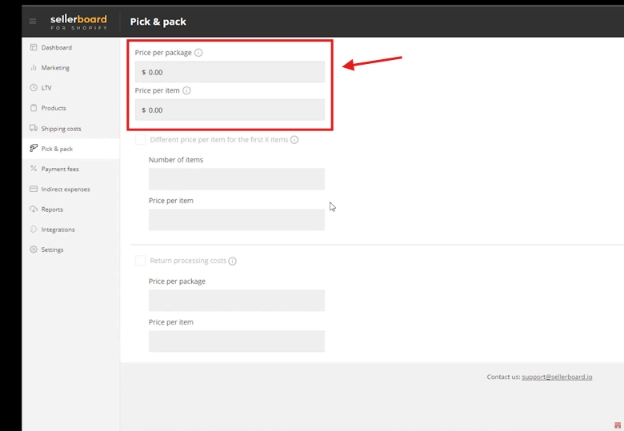
If your warehouse offers tiered pricing, you can also enable different prices for first X items.
For example, the first item might cost $0.50 to pick, and each additional item in the same order could cost $0.20.
This pricing structure reflects real-world efficiency: once a worker is already at the shelf, it’s quicker to grab a second or third unit.
Get 2-Month Extended Sellerboard Free Trial
Don’t Forget Return Handling Costs
Returns are a reality of e-commerce, and they also require Pick & Pack-like labor.
Warehouses often charge for processing returned items, which may include:
-
Unpacking and inspecting the item.
-
Restocking it if it’s in sellable condition.
-
Disposing or repackaging if it’s damaged.
In Sellerboard, you can enter return processing costs separately for both package-level and item-level pricing.
Discover how to structure your shipping costs in Sellerboard: Setting Up And Managing Shipping Costs In Sellerboard For Shopify - Tutorial
Why Accuracy Here Improves Profitability Tracking
If you leave Pick & Pack and return handling out of your cost calculations, Sellerboard will show inflated profits.
By entering these expenses accurately:
-
You’ll see your true profit margins.
-
You can decide if a product’s fulfillment costs are eating too much into your revenue.
-
You’ll spot opportunities to renegotiate with your 3PL or adjust your pricing strategy.
Final Thoughts
Pick & Pack costs might not seem huge per order, but over hundreds or thousands of sales, they add up quickly.
Using Sellerboard for Shopify to track them ensures you’re making decisions based on real margins, not best-case assumptions.
-: Learn How To Use Sellerboard For Shopify :-
Dive into my Playlist of Sellerboard Tutorials