How To Contact Jungle Scout Customer Service And Support?

If you're using Jungle Scout and need help, you're definitely not alone.
Maybe you're having trouble navigating the platform, setting up a feature, or just have a question about your account.
Getting in touch with Jungle Scout's customer support team is easy; once you know the right channel.
In this guide, I’ll walk through all the official ways to contact Jungle Scout customer service, explain what kind of help you can expect, and show you how to make sure your request gets the attention it deserves.
Get the Best Discount Deals on Jungle Scout
Let’s dive in and break down the best ways to connect with Jungle Scout’s support team.
Why Contact Jungle Scout Support?
Sometimes, even with the most intuitive software, questions come up.
You might be trying to troubleshoot the Chrome extension, wondering how to use certain features, or just looking for clarification about your billing or subscription.
Whatever the case may be, Jungle Scout encourages users to reach out, and they’ve made several support options available to make that process smooth and effective.
Jungle Scout openly states that they’re committed to improving the product based on customer feedback.
That’s why they’re not just there to respond, but also to listen.
So if you’ve had an experience worth sharing, good or bad, or you simply need answers, they’re ready to help.
Email Support: The Direct Way to Get Help
The simplest and most direct method to contact Jungle Scout is by email.
You can send your inquiries or issues to their official support address: support@junglescout.com
When sending an email, make sure your message is clear and organized.
Include your registered email address (if it’s different from the one you’re using to write), describe the problem in detail, and, if applicable, attach any screenshots or files that might help the team understand your issue faster.
The more specific you are, the easier it will be for the support reps to assist you effectively.
FYI, this email address is monitored by their global customer support team, who typically responds promptly.
While response times may vary depending on ticket volume, many users report receiving help within a day, often sooner.
Submit a Ticket Through the Contact Form
If you'd rather not use email directly, another option is to submit a request through Jungle Scout’s official contact form.
You can access the form at this link: https://get.junglescout.com/contact-form
Once there, you’ll be asked to fill out several fields including:
-
Your email address
-
The category of your issue (for example: technical problem, billing question, or feature request)
-
A subject line
-
A detailed description of your request
-
An option to add file attachments
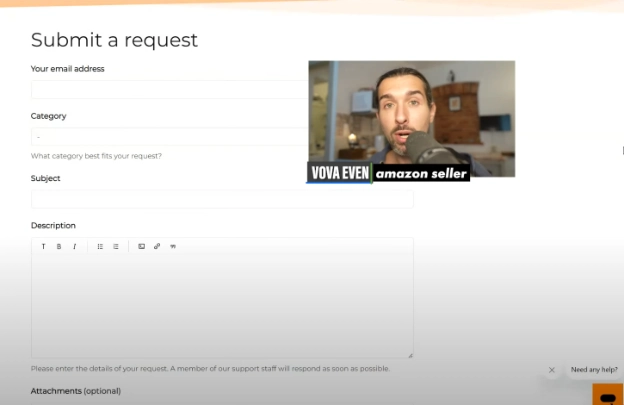
This method allows Jungle Scout’s system to route your ticket to the most appropriate team member.
It also helps avoid confusion and reduces the need for back-and-forth emails.
Just like with regular email support, clarity and detail are key.
Explain what’s going on, what steps you’ve tried, and what kind of help you’re looking for.
-: Gentle Reminder :-
Get the Best Discount Deals on Jungle Scout
Jungle Scout Help Center: Self-Service Support
Sometimes, you might not need to contact support at all.
Jungle Scout maintains an extensive Help Center, which acts as a searchable knowledge base full of how-to articles, troubleshooting guides, and FAQs.
It’s designed to give users fast answers to common questions, with content that’s constantly updated and expanded.
Here’s the direct link: https://get.junglescout.com/help-center
Inside the Help Center, you’ll find categories based on specific tools and features. For example:
-
Billing and Account Management
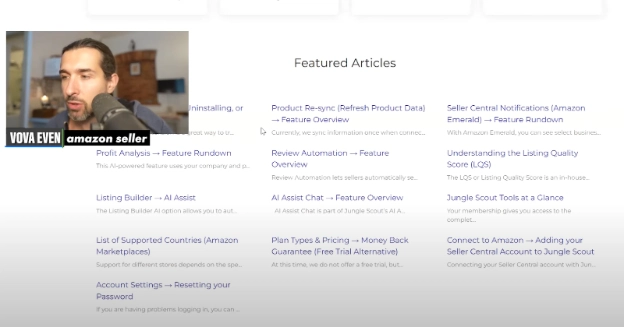
Each article is written in plain language and often includes step-by-step instructions or visuals to guide you.
If you’re new to Jungle Scout or need a refresher on how something works, this is a great place to start.
The platform also regularly adds new content, so even if you’ve visited before, it’s worth checking again if you’re stuck.
In-App Help Widget: Instant Assistance While Using the Tool
If you're already logged into your Jungle Scout account, you’ll find an additional support tool right within the platform.
Look to the bottom right corner of your screen, and you’ll notice a small circular widget with a question mark icon; that’s your in-app help assistant.
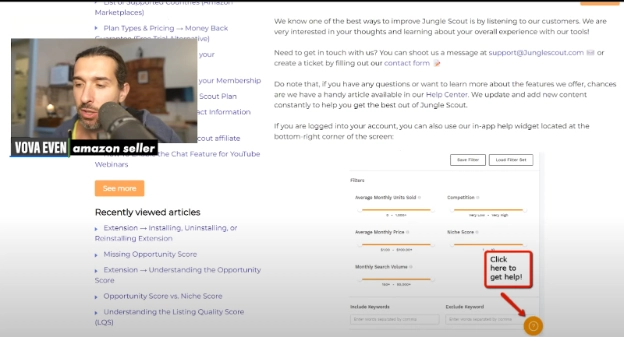
Clicking on it will open a pop-up where you can search the Help Center directly without leaving your current screen.
You can also use the “Contact Us” option from the widget if you don’t find the answers you need.
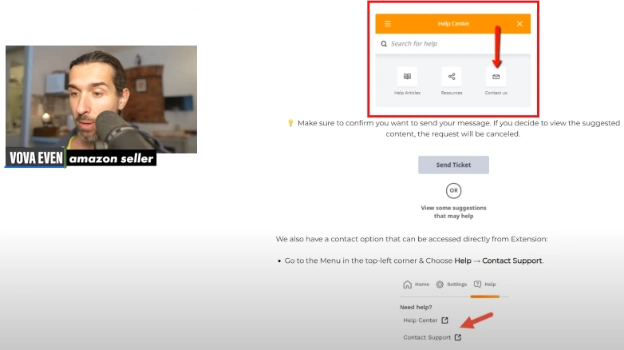
That takes you to a support form where you can create a new ticket; right from inside the app.
Here’s a quick tip: when you click “Contact Support,” make sure to confirm your intent to send a message. Sometimes, the system may suggest related articles first. If you decide to explore those and change your mind, your ticket won’t go through.
So, confirm the action if prompted, that way, your request will be officially submitted.
This feature is handy for solving problems on the go.
It’s especially useful if you’re deep into Amazon product research and suddenly hit a snag; you don’t have to leave your workflow to get help.
-: Gentle Reminder :-
Get the Best Discount Deals on Jungle Scout
Chrome Extension Support Access
Jungle Scout’s browser extension is a popular tool used by many sellers on Amazon.
If you’re using the extension and run into trouble, you can also access support directly from there.
To do this:
-
Open the Jungle Scout extension while on an Amazon product or search results page.
-
Click on the menu icon (this may appear in the top-left or top-right corner depending on updates to the layout).
-
Choose “Help” and then click “Contact Support.”
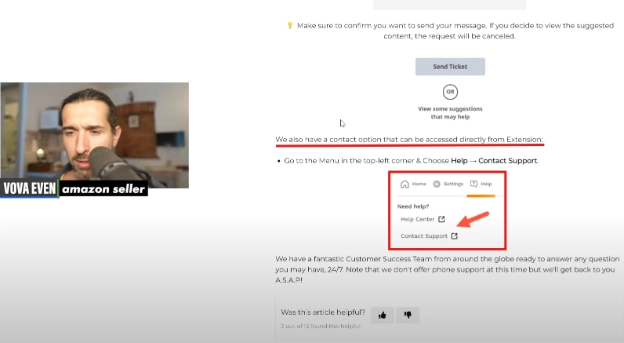
This option works similarly to the main contact form and routes your request through the same system.
You’ll also see a link to the Help Center from within this menu, so you can choose either self-service or direct contact depending on your needs.
It’s worth noting that Jungle Scout occasionally updates the extension’s interface, so the location of these buttons might shift slightly.
If you don’t see the Help option where you expect, check the other corners of the window or look for icons that resemble a question mark or a gear.
Is There Phone Support?
At the time of writing, Jungle Scout does not offer phone or telephone-based customer service.
They’ve chosen to focus their resources on digital channels, primarily email and support tickets, to ensure consistent, high-quality assistance across time zones.
According to the company, this setup helps them maintain faster response times and more accurate answers.
While it might feel less personal than speaking to someone on the phone, the email and ticket-based system is designed to give you complete and trackable responses.
Of course, this might change in the future, so if phone support becomes available later on, it’ll likely be announced through their Help Center or official website.
Tips for Getting the Best Support Experience
If you want your issue resolved quickly and efficiently, here are a few helpful suggestions:
-
Be Clear and Specific: Describe the issue in detail.What were you doing when it happened? What result were you expecting? What actually occurred?
-
Attach Screenshots: A picture really can be worth a thousand words. Screenshots help the team visualize your problem and often speed up the troubleshooting process.
-
Use the Right Channel: If you're logged into the app, use the in-app widget. If you’re on the browser extension, use its Help menu. These paths are tailored to your current setup.
-
Check the Help Center First: You might find an instant solution there, no wait time required.
-
Be Polite and Patient: The support team is there to help, and a respectful tone goes a long way in making interactions smoother and more productive.
-: Gentle Reminder :-
Get the Best Discount Deals on Jungle Scout
In Summary: All Contact Options at a Glance
Here’s a quick overview of all your options for contacting Jungle Scout customer support:
<table><tbody><tr><td><p dir="ltr"><span>Method</span></p></td><td><p dir="ltr"><span>Description</span></p></td><td><p dir="ltr"><span>Link</span></p></td></tr><tr><td><p dir="ltr"><span>Email</span></p></td><td><p dir="ltr"><span>Direct email support</span></p></td><td><p dir="ltr"><a href="mailto:support@junglescout.com" target="_blank" title="support@junglescout.com"><span>support@junglescout.com</span></a></p></td></tr><tr><td><p dir="ltr"><span>Contact Form</span></p></td><td><p dir="ltr"><span>Submit a ticket through a structured form</span></p></td><td><p dir="ltr"><a href="https://get.junglescout.com/contact-form" target="_blank" title="Contact JungleScout here ↗"><span>https://get.junglescout.com/contact-form</span></a></p></td></tr><tr><td><p dir="ltr"><span>Help Center</span></p></td><td><p dir="ltr"><span>Browse articles and FAQs</span></p></td><td><p dir="ltr"><a href="https://get.junglescout.com/help-center" target="_blank" title="Jungle Scout Help Centre ↗"><span>https://get.junglescout.com/help-center</span></a></p></td></tr><tr><td><p dir="ltr"><span>In-App Widget</span></p></td><td><p dir="ltr"><span>Use the in-app assistant to search help or submit a ticket</span></p></td><td><p dir="ltr"><span>Bottom-right corner of logged-in dashboard</span></p></td></tr><tr><td><p dir="ltr"><span>Extension Help</span></p></td><td><p dir="ltr"><span>Access support from within the Chrome extension</span></p></td><td><p dir="ltr"><span>Menu > Help > Contact Support</span></p></td></tr><tr><td><p dir="ltr"><span>Phone Support</span></p></td><td><p dir="ltr"><span>Currently not available</span></p></td><td><p dir="ltr"><span>– – –</span></p></td></tr></tbody></table>Jungle Scout has put a lot of effort into building a responsive, reliable support system.
From detailed self-help articles to personalized email replies, their goal is to ensure you get the most out of your subscription; whether you're just getting started or scaling up your Amazon business.
Remember: While phone calls aren’t an option right now, the other tools in place are more than capable of delivering fast, helpful responses. So don’t hesitate to reach out through any of the channels listed above; help is just a few clicks away.