Sellerboard For Shopify - Indirect Expenses Tab Tutorial


In this guide
When running a Shopify store, keeping track of every cost is essential for understanding your true profitability.
One area that often gets overlooked is indirect expenses, the overhead costs that aren’t directly tied to a single sale but still impact your bottom line.
Sellerboard for Shopify makes it easy to log, track, and analyze these expenses through its Indirect Expenses tab.
Get 2-Month Extended Sellerboard Shopify Free Trial
What Are Indirect Expenses?
Indirect expenses include costs like:
-
Accountant or tax consultant fees
-
Office or warehouse rent
-
Subscription services (software tools, marketing platforms)
-
Packaging materials
-
Photography services
-
Virtual assistants or freelance help
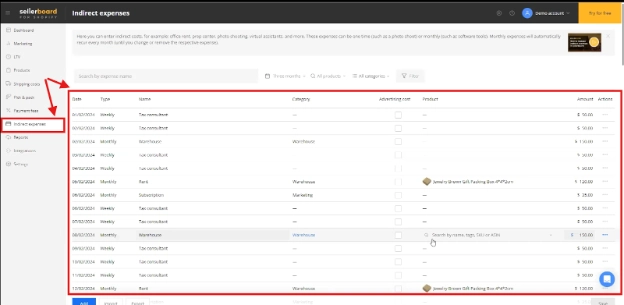
These aren’t part of your product cost or shipping fees but still need to be factored into your profit calculations.
You may find this comparison useful before deciding how you want to manage your expenses: Sellerboard vs Shopkeeper App - Which Profit Dashboard Fits Your Amazon
Adding a New Indirect Expense in Sellerboard
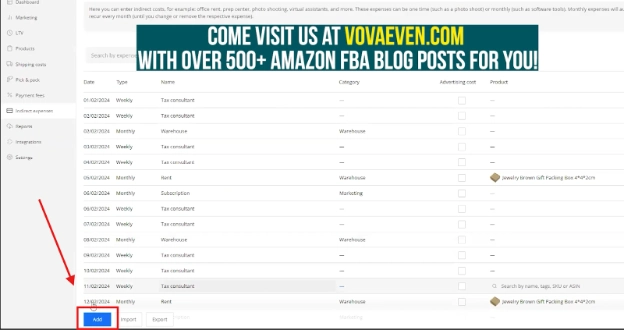
To enter an expense, click the Add button in the Indirect Expenses tab.
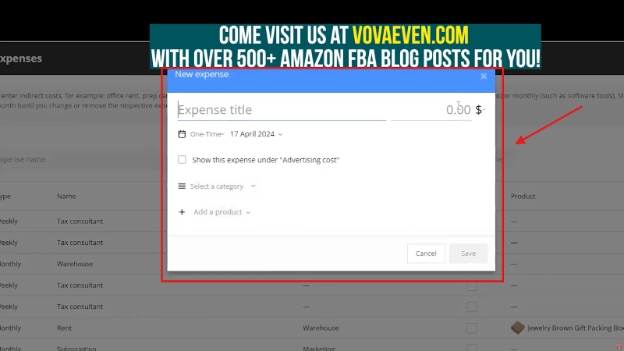
A pop-up window will appear where you can:
-
Name the Expense: Give it a clear title, such as “Tax Consultant” or “Warehouse Rent.”
-
Enter the Amount: Specify the exact value of the expense.
-
Select Frequency: Choose whether it’s a One-Time, Daily, Weekly, Monthly, Quarterly, Half-yearly, or Annual expense. This ensures recurring costs are automatically applied in future months.
-
Advertising Cost Option: Tick the box if this expense should be treated as advertising in your profit reports (e.g., Facebook Ads, influencer fees).
-
Assign a Category: Group expenses for better analysis. For example, “Marketing,” “Warehouse,” or “TikTok” promotions.
-
Link to Specific Products: If the expense only relates to certain items (such as a photoshoot for a new jewelry collection), you can assign it to those products only.
-: Gentle Reminder :-
Get 2-Month Extended Sellerboard Shopify Free Trial
Why Categorizing Matters
Categorizing your indirect expenses lets you drill down into where your money is going.
If you’re overspending in “Marketing” but underinvesting in “Product Photography,” you can adjust accordingly.
Applying Expenses to Products
Not all expenses apply to every product.
Sellerboard’s ability to assign costs to individual SKUs ensures your profit calculations remain accurate.
For instance, packaging costs for premium gift boxes should only apply to products that use them.
Importing and Exporting Data
If you already track your expenses elsewhere, you can import them into Sellerboard for quick setup.
Likewise, you can export your expense data for accounting or tax purposes.
If you are a UK or EU seller, this guide shows how to manage VAT in Sellerboard: Sellerboard VAT - What It Means and How to Use It
The Big Picture: Profit Accuracy
Indirect expenses may seem small individually ($50 a week for a tax consultant, $120 a month for packaging) but over a year, they add up.
Without tracking them, you could be making decisions based on inflated profit margins.
Sellerboard’s Indirect Expenses tab brings transparency, ensuring every cost, no matter how small, is accounted for.
Whether you’re paying for software tools, warehouse space, or creative services, having all expenses in one place helps you make informed pricing, marketing, and growth decisions.
Get 2-Month Extended Sellerboard Shopify Free Trial