What Is SmartScout? How To Make The Most Out Of This Amazon Software?

In this guide
If you’re an Amazon seller looking for profitable product opportunities, SmartScout is a powerful software tool you’ll want to know about.
It helps you discover high-potential niches, track competitors, and analyze brand data all in minutes.
In this article, I’ll not only explain what SmartScout is, but I’ll also share valuable resources that will help you make the most out of it.
Talk about discount offers, tutorials, and practical examples straight from my conversation with SmartScout founder, Scott Needham.
By the end, you’ll know exactly how to use SmartScout to find products faster, make smarter decisions, and grow your Amazon business confidently.
Get 25% Off On SmartScout For 3 Months (Code: VOVA25)
What is SmartScout and How Does It Stand Out
SmartScout is an Amazon research platform designed for sellers who want clearer, deeper data before making decisions.
While most tools focus on individual product listings, SmartScout takes a broader approach.
It lets you analyze Amazon from a top-down view, so you can explore entire niches, monitor competing sellers, and assess brand-level activity all from one place.
What truly sets it apart is how it transforms Amazon’s massive raw data into clean, usable insights.
Instead of clicking through pages of listings manually, SmartScout pulls millions of data points directly from Amazon’s catalog and organizes them into easy-to-understand filters and dashboards.
With just a few clicks, you can identify which brands dominate a category, which sellers are gaining traction, and where the market may have untapped opportunities.
This level of visibility is especially useful when you're planning what to sell next, researching a niche, or figuring out where the competition is weakest.
If you’re curious about how SmartScout’s pricing compares to the value it offers, I’ve broken down all the plans in detail here: SmartScout Price & Pricing Plans Review
How to Use SmartScout
Would you like to see how it works in real time and understand exactly what makes it different from other tools?
You must watch the 42-minute tutorial I recorded with Scott Needham.
-: Learn How To Use SmartScout :-
I also have a written version for you in case you prefer reading over watching: How To Use SmartScout For Amazon Product Research - Tutorial & Review
In this session, Scott and I go through real examples of how to use SmartScout’s tools step-by-step.
Scott has sold over $400 million on Amazon, and I’ve sold a few million myself, so between us, you’re getting insights from years of experience in the trenches.
This video isn’t just a feature walkthrough, it’s a practical training that shows you how to apply SmartScout to real Amazon business scenarios.
We discuss how to:
-
Identify profitable niches
-
Discover powerful Amazon brands with SmartScout Brands Tool
-
Spot hidden opportunities competitors miss
If you watch just one resource from this article, make it this one.
It’ll save you hours of trial and error.
Get 25% Off On SmartScout For 3 Months (Code: VOVA25)
What You Can Actually Do With SmartScout
Let’s walk through some of SmartScout's most useful features and how they can help you sell better.
See Competitor Playbooks and Brand Insights
One of the coolest parts of SmartScout is how it lets you peek behind the curtain of your competitors’ operations.
With just a few clicks, you can:
-
View any brand’s estimated revenue
-
See how many products they sell
-
Discover their best-performing categories
-
Analyze who their top sellers are
For example, if you search for a major brand like Adidas or Reebok, SmartScout shows you their entire catalog, performance data, and even links to the ASINs they’re ranking for.
This kind of transparency helps you make smarter sourcing and advertising decisions, and it’s especially powerful if you’re trying to understand market share or benchmark your own performance.
Find Your Niche Fast With Subcategory Insights
When you’re trying to find your next winning product, the hardest part is often figuring out where to look.
That’s where SmartScout’s Subcategory tool comes in handy.
SmartScout has broken down Amazon into over 42,000 subcategories.
Each one has an estimated total value, so you can see how big a market is before diving in.
For example, let’s say you’re looking at Home & Kitchen.
You can keep narrowing down through Kitchen & Dining → Small Appliances → Storage & Organization → Food Storage Containers, and SmartScout will show you key metrics like estimated revenue, brand count, and growth potential.
This is a game changer because you can:
-
Identify niches with high demand and low competition
-
Discover hidden subcategories no one is talking about
-
Prioritize where to launch your next product
In our tutorial video I shared above, Scott and I walk through this exact process step-by-step, so you can see how to turn data into decisions.
Filter Millions of Product Options Efficiently
Another reason SmartScout stands out is how easy it makes sorting and filtering through Amazon’s massive product database.
Imagine being able to instantly find:
-
Products between certain price ranges
-
ASINs with a specific number of reviews
-
Items that rank well but have weak listings
-
Brands that dominate a category
That’s exactly what SmartScout's Seller Map helps you do.
Its advanced filters let you go from millions of options to a focused, profitable shortlist in seconds.
You can combine filters to get highly specific results.
For instance, you could search for “kitchen gadgets under $40, with at least 200 reviews, and fewer than 3 top sellers dominating the market.”
This precision makes SmartScout not just a research tool, but a decision-making partner.
Instead of guessing what might sell, you base every move on real data.
Use The SmartScout Seller Map For Free
Real Feedback From Other Amazon Sellers
If you’re still wondering whether SmartScout really works in practice, you’ll be glad to know that many Amazon sellers are already seeing great results with it.
On SmartScout’s website, you can read testimonials from sellers just like you.
For example, see the screenshot below:
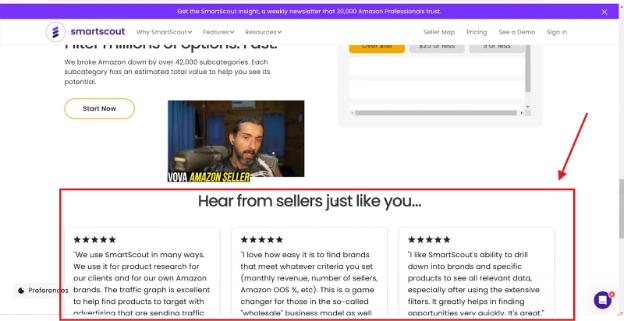
Hearing from real users adds that extra confidence.
You’re not just taking my word for it, you're seeing what other people in the same trenches have experienced.
And if you’ve already tried SmartScout, feel free to share your feedback too.
The community around this tool is active and full of helpful sellers who love discussing what’s working for them.
Download SmartScout Chrome Extension
Conclusion
To wrap up, SmartScout is more than just an Amazon product research tool.
It’s a complete data hub that helps sellers make smarter, faster, and more confident decisions.
Whether you’re a beginner or a seasoned seller, SmartScout can help you:
-
Spot profitable product opportunities
-
Analyze competitors and brands
-
Understand the true value of different categories
-
Save hours of manual research
If you haven’t tried it yet, don’t miss the 25% OFF offer and the 7-day money-back guarantee.
Get 25% Off On SmartScout For 3 Months (Code: VOVA25)
Also, make sure to check out my SmartScout tutorial with Scott Needham.
I hope this guide helps you make the most out of SmartScout and discover some amazing new opportunities for your business.
If you’re new to SmartScout, my video playlist will walk you through the basics and beyond.
Dive Into My Playlist of SmartScout Tutorials
Good luck, and may your next product be your best one yet! 🚀
P.S. - I recently published a detailed guide explaining whether SmartScout offers a free trial, how the 7-day money-back guarantee works, and how to get the best discount, read here: Is There a SmartScout Free Trial & Account? Discover The Answer & Get The Best Discount Coupon Code!