Jungle Scout Opportunity Finder: Amazon Niche Research Guide


In this guide
The quick answer
What is Jungle Scout Opportunity Finder?
Jungle Scout Opportunity Finder is an Amazon product research tool that finds potential niches through shopper search terms rather than starting with individual products. You can filter by search volume, average monthly sales, price, competition, and seasonality, then examine historical trends and the products already serving a niche. The goal is to discover a customer need worth investigating, not to assume every promising keyword guarantees a profitable product.
When you begin Amazon FBA product research, it is tempting to look for one product that already sells well and try to find something similar. That can work, but there is another direction: discover what people are shopping for first, then explore the different products that answer their search.
That is the idea behind Opportunity Finder. In the video below, we compare it with Jungle Scout's Product Database, work through filters in the Patio, Lawn & Garden category, and explore why a broad keyword such as “grill brush” may contain several more focused opportunities.
I'll also show how to interpret the data carefully. A niche with demand is a useful starting point, but a real product decision needs evidence about competitors, differentiation, costs, and the timing of demand.
Affiliate disclosure
Some links in this guide are affiliate links. If you choose to subscribe through them, I may earn a commission at no extra cost to you. I share the research process so you can decide whether the tool fits your business.
Opportunity Finder vs. Product Database: where should you start?
The difference is the level at which you begin researching. Product Database starts with individual Amazon listings and ASINs. Opportunity Finder starts with a keyword representing a group of related products. Both are valuable because customers search for needs, while sellers eventually have to choose a specific item to manufacture, source, and list.
Imagine finding a specific outdoor cleaning brush in Product Database. You can inspect that listing and ask what related products customers might buy. With Opportunity Finder, you might begin with the broader search term “grill brush,” then investigate the different designs people expect to see under that phrase.
| Research question | Opportunity Finder | Product Database |
|---|---|---|
| What do I discover first? | Keyword-defined niches and shopper demand | Specific products and ASINs |
| What helps narrow results? | Search volume, niche sales, trends, seasonality, competition | Product price, sales, reviews, size, rating, listing quality |
| Best next move | Open the niche and investigate relevant products | Use the ASIN to explore its market and alternatives |
Neither method is inherently better. I would start with Opportunity Finder when I have no clear product idea, and with Product Database when I already know the kind of item I want to compare. It is perfectly reasonable to move back and forth between them.
If you're new to the wider platform, my complete Jungle Scout beginner tutorial puts the different research tools in context.
How to use Jungle Scout Opportunity Finder step by step
Open Product Research → Opportunity Finder inside Jungle Scout Catalyst. The official Opportunity Finder help guide confirms the main controls, including marketplace selection, category filters, search trends, Niche Score, and keyword inclusion or exclusion.
- Choose your Amazon marketplace. Research the country where you plan to sell. US demand and prices cannot automatically be applied to another marketplace.
- Select a category. The video uses Patio, Lawn & Garden. You can explore multiple parent categories, although starting with one you understand makes the results easier to judge.
- Enter minimum average monthly units sold. The demonstration uses 400 units. This is an example of a demand filter, not a required sales threshold for every niche.
- Add monthly search volume. The example sets a 3,000-search minimum. This measures estimated searches for the niche keyword over the recent 30-day period, not orders or unique customers.
- Set an average monthly price. The presenters use a $30 minimum to screen for a price point worth exploring. You will still need to calculate whether your specific product can support that price.
- Adjust competition and seasonality. The walkthrough uses medium settings for both. Those selections are useful for demonstrating the filters; they do not eliminate the need to examine the actual historical charts.
- Search and open interesting niches. Read the keyword phrases, compare the surrounding metrics, expand the history, and inspect the top products before adding anything to a shortlist.
Important: A 400-unit filter applies to estimated average sales for listings in the niche, not a promise that a new seller will sell 400 units. Similarly, 3,000 searches does not mean 3,000 purchases.
You can also refine a search using 30-day and 90-day search-volume trends, a 1–10 Niche Score, included or excluded keywords, and the option to exclude top brands. I would add those controls gradually. Overly restrictive filters can hide niches worth investigating, especially when you are still learning the category.
If you expect to repeat this process, save a filter preset rather than rebuilding your criteria every time. Jungle Scout's saved-filter guide explains how to reuse a consistent starting point while testing different categories.
Jungle Scout special deals
Research your next Amazon niche with Jungle Scout
Explore the available offer
Use my Jungle Scout deals link to review the plans and any eligible promotion. Features and discounts can change, so compare the final checkout terms with the tools you actually need.
How to read a niche without mistaking demand for profit
Once the results appear, you are looking at keywords that represent groups of products. A phrase such as “Halloween blow-ups” can cover inflatable decorations of different sizes, characters, and designs. The niche keyword is the doorway into a market, not the name of a single ASIN.
Average monthly units sold
A demand signal based on the products associated with a niche. Look for sales spread across several listings rather than one exceptional seller.
Monthly search volume
Estimated recent searches for the keyword. It indicates interest, but some searches do not lead to purchases.
Average selling price
A reference point for what existing products sell for. It is not the margin left after fees, advertising, shipping, and returns.
Competition and Niche Score
Helpful screening indicators. The Niche Score weighs demand, competition, and listing quality; it is not a forecast of your future profit.
I also like comparing the 30-day and 90-day search trends. A brief jump may reflect an emerging interest, a seasonal event, or temporary attention. Comparing more than one period helps you ask better questions before you assume a trend will continue.
Jungle Scout distinguishes the Opportunity Finder Niche Score from the browser Extension's Opportunity Score. They are calculated from different product groups. The official comparison is useful if you see different scores while moving between the two tools.
The Halloween blow-ups example: why seasonality matters
The video search returns Halloween-related phrases, including “Halloween blow-ups” and “life-size skeleton.” The presenters were recording around the North American Halloween shopping period, which explains why those niches appeared prominently at that moment. Do not read the video's “it's October” remark as a description of the market today.
When the “Halloween blow-ups” niche is expanded, the sales chart shows a dramatic pattern: high activity around autumn followed by much quieter spring and summer months. The presenter points to historical monthly readings of approximately 261 units in November 2020 and 939 in an October shown in the recording. Those are historical chart values, not current sales figures.
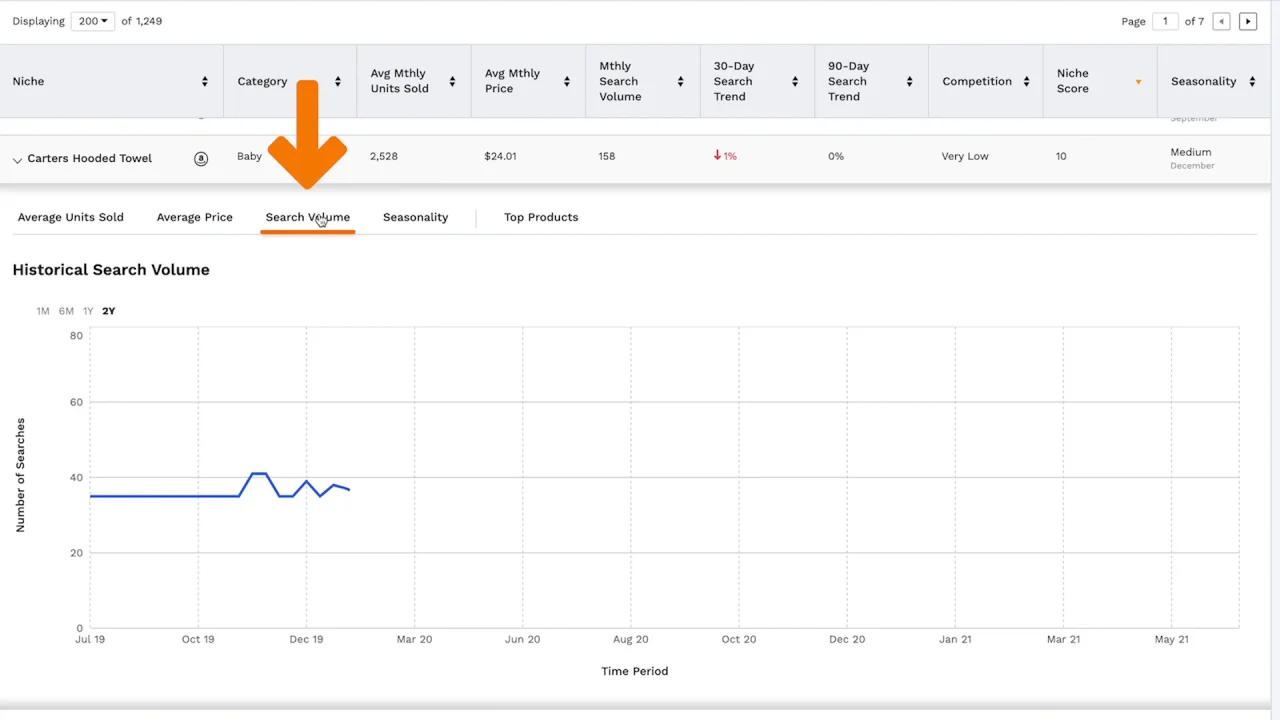
The chart's sales, search volume, average price, and seasonality views answer different questions. Does demand return predictably each year? Does the selling price hold up during the peak? Are searches increasing before orders rise? Is there enough time to source inventory before the buying window closes?
For a seasonal product, timing becomes part of the product decision. You might need to order inventory months before customers start buying, and unsold stock can create storage costs after the peak. For an evergreen product, I would instead look for a stable baseline across multiple months. Neither pattern is automatically superior; the right fit depends on how you manage inventory and cash flow.
From “grill brush” to “bristle-free grill brush”: finding a sub-niche
The grill-brush discussion is the most practical lesson in the video. “Grill brush” is a broad Amazon search term, but shoppers who type it may have very different product preferences. Some want a traditional metal-bristle brush. Others seek a bristle-free cleaning solution or a brush with a wooden handle.
One presenter shares an example from his own selling experience: a bristle-free grill brush. It is not a completely separate customer problem. It is a more specific answer to the broader task of cleaning a grill, particularly for buyers who prefer to avoid metal bristles.
Broad search
Grill brush
A large group of possible designs, materials, and customer preferences.
Narrower search
Bristle-free grill brush
A product direction with a clearer feature preference to research and validate.
At first glance, a busy grill-brush market might look impossible to enter. But the broad keyword could conceal differences in buyer intent. The useful question becomes: which type of brush do buyers want, what are existing listings missing, and is there enough demand for a better-defined solution?
I would open the top products within the broad niche, group them by design, then search narrower phrases directly on Amazon. Pay attention to what appears repeatedly in reviews and product questions. Complaints about cleaning performance, durability, or confusing instructions can suggest areas to investigate; they do not automatically prove a market gap.
Use Keyword Scout and Keyword Lists to examine related searches and organize relevant phrases. A niche is interesting when you can describe a specific buyer, a specific need, and a realistic way your product could serve that need better.
How to validate an Amazon niche before ordering inventory
Opportunity Finder is a discovery tool, not the last step before sending money to a supplier. Once you have a promising niche, I recommend a short validation process that turns the keyword idea into an evidence-based product decision.
- Inspect several top products. Open the Top Products view for the niche and compare relevant ASINs. Look at features, review volume, prices, brands, availability, and how similar the offers really are.
- Study the sales history. Add representative products to Product Tracker and observe them for at least a few weeks. A single estimated sales snapshot is not enough to establish reliable demand.
- Check competing search results. Search the niche keyword and its more specific variations on Amazon. Use the Jungle Scout Extension to compare the listings shoppers actually see.
- Find a meaningful difference. Note common review complaints, unmet preferences, pack-size gaps, or confusing product information. Confirm that the improvement is technically possible and matters to buyers.
- Calculate real costs. Estimate sourcing, packaging, freight, Amazon referral and fulfillment fees, advertising, returns, taxes, and any relevant compliance costs before deciding on a selling price.
- Check execution risks. Request samples, assess quality, consider intellectual-property and product-safety requirements, and plan inventory around the actual demand pattern.
A simple margin example
Suppose a product sells for $30. If its landed cost is $8, Amazon fees are $9, and average advertising cost per order is $4, that leaves $9 before returns, overhead, taxes, and other expenses.
These figures are hypothetical, not actual Jungle Scout results. The exercise shows why a $30 niche price does not equal a $30 profit opportunity.
Jungle Scout's product research guidance also recommends tracking products over time before making an informed launch decision. I would rather reject an exciting niche after good research than discover its weaknesses after paying for inventory.
Common Opportunity Finder mistakes to avoid
The biggest error is treating a high Niche Score as permission to launch. Scores summarize some useful signals, but they cannot know your supplier quote, brand positioning, product quality, or advertising performance. A strong score deserves more research, not blind confidence.
Another mistake is comparing a recent search-volume peak with a full-year sales plan. Halloween products can be attractive in October and quiet in May. Check the entire pattern before forecasting demand, and account for the cost of holding seasonal inventory.
Finally, do not assume a crowded broad keyword means every sub-niche is equally crowded—or that a less crowded sub-niche is automatically worth launching. The grill-brush example works as a research method because it prompts you to examine product types separately. You still need proof that customers want the specific solution.
Keep your shortlist small enough to investigate properly. Three well-researched niche ideas will often be more useful than fifty attractive-looking keywords that you have not validated.
Is Jungle Scout Opportunity Finder worth using?
Opportunity Finder is especially useful when you want to explore product categories without committing to a particular ASIN. It helps you move from “I need an idea” to a more focused question about demand, competition, seasonality, and the products buyers already compare.
The tool is part of Jungle Scout's Catalyst product research workflow, but access and historical data allowances depend on your subscription. Check the current plan comparison before paying, rather than relying on the plan names or prices mentioned in an older tutorial.
For beginners, the value is having a structured way to discover and reject ideas. For experienced sellers, it can reveal adjacent niches and product variations worth testing. In both cases, the data supports judgment; it cannot replace it.
Frequently asked questions about Opportunity Finder
Does Opportunity Finder show products or keywords?
It starts with keyword-based niches, each representing a group of related products. You can then open Top Products to investigate the individual listings associated with that search term.
What is a good Jungle Scout Niche Score?
The score ranges from 1 to 10, with higher numbers indicating more favorable signals according to Jungle Scout's model. There is no score that guarantees profit. Review demand, competition, listing quality, and your actual costs before deciding.
How do I find low-competition Amazon niches?
Begin with a category and relevant sales or search-volume filters, then narrow the competition setting. Look inside broad niches for specific customer preferences, and examine the real Amazon results before treating a niche as underserved.
Is Opportunity Finder useful for seasonal products?
Yes. Historical sales, search volume, and seasonality views can reveal repeated demand spikes. Use them to investigate timing and inventory risk, not to assume this year's sales will repeat a previous year's peak.
Can I use Opportunity Finder without a product idea?
Absolutely. That is one of its strongest uses. Start with a category and practical filters, explore the resulting search terms, then use Product Database, Extension, and Product Tracker to narrow a broad idea into a product you can evaluate.
Your next product research session
Start broad. Find the niche. Then validate the product.
Jungle Scout special deals
Compare the available Jungle Scout offers, then use Opportunity Finder to build a shortlist and the other research tools to test your ideas. Review current pricing and eligibility before subscribing.
A promising niche starts a research process. A sustainable product needs a compelling offer and economics that work.